
/jekyll-now/ link-2
#mp3直链 #mp4直链
Open embed
看到了一个用Open embed插件添加音乐的方法, 简洁大方!
Step 1. Download the file open-embed.html
首先去下载open-embed.html这个文件:
<style>
.videoWrapper {
	position: relative;
	padding-bottom: 56.333%;
	height: 0;
    background: black;
}
.videoWrapper iframe {
	position: absolute;
	top: 0;
	left: 0;
	width: 100%;
	height: 100%;
    border: 0;
}
</style>

<script>
function get_youtube_id(url) {
    var p = /^(?:https?:\/\/)?(?:www\.)?(?:youtu\.be\/|youtube\.com\/(?:embed\/|v\/|watch\?v=|watch\?.+&v=))((\w|-){11})(?:\S+)?$/;
    return (url.match(p)) ? RegExp.$1 : false;
}
function vimeo_embed(url,el) {
    var id = false;
    $.ajax({
      url: 'https://vimeo.com/api/oembed.json?url='+url,
      async: true,
      success: function(response) {
        if(response.video_id) {
          id = response.video_id;
          if(url.indexOf('autoplay=1') !== -1) var autoplay=1; else var autoplay=0;
          if(url.indexOf('loop=1') !== -1) var loop=1; else var loop=0;
          var theInnerHTML = '<div class="videoWrapper"><iframe src="https://player.vimeo.com/video/'+id+'/?byline=0&title=0&portrait=0';
          if(autoplay==1) theInnerHTML += '&autoplay=1';
          if(loop==1) theInnerHTML += '&loop=1';
          theInnerHTML += '" webkitallowfullscreen mozallowfullscreen allowfullscreen></iframe></div>';
          el.innerHTML = theInnerHTML;
        }
      }
    });
}
function video_embed() {
    var p = document.getElementsByTagName('p');
    for(var i = 0; i < p.length; i++) {
        //check if this is an external url (that starts with https:// or http://
        if (p[i].innerHTML.indexOf("http://") == 0 ||
            p[i].innerHTML.indexOf("https://") == 0) {
            var youtube_id = get_youtube_id(p[i].innerHTML);
            if(youtube_id) {
                if(p[i].innerHTML.indexOf('autoplay=1') !== -1) var autoplay=1; else var autoplay=0;
                if(p[i].innerHTML.indexOf('loop=1') !== -1) var loop=1; else var loop=0;
                var theInnerHTML = '<div class="videoWrapper"><iframe width="720" height="420" src="https://www.youtube.com/embed/' + youtube_id + '?rel=0&showinfo=0';
                if(autoplay==1) theInnerHTML += '&autoplay=1';
                if(loop==1) theInnerHTML += '&loop=1&playlist='+youtube_id+'&version=3';
                if(p[i].innerHTML.indexOf('start=') !== -1) theInnerHTML += '&start='+p[i].innerHTML.substring(p[i].innerHTML.indexOf('start=')+6);
                theInnerHTML += '" frameborder="0" allowfullscreen></iframe></div>';
                p[i].innerHTML = theInnerHTML;
            }
            if(p[i].innerHTML.indexOf('vimeo.com') !== -1) {
                //ask vimeo for the id and place the embed
                vimeo_embed(p[i].innerHTML,p[i]);
            }
        }
    }
}
video_embed();

function mp3_embed() {
    var p = document.getElementsByTagName('p');
    for(var i = 0; i < p.length; i++) {
        if(p[i].innerHTML.indexOf('.mp3') !== -1) {
            var str = p[i].innerHTML.split('?');
            if(str.length == 1) str[1] = '';
            var str1 = str[1];
            str1 = str1.replace('&','').replace('&','');
            str1 = str1.replace('autoplay=1','').replace('autoplay=0','');
            str1 = str1.replace('loop=1','').replace('loop=0','');
            str1 = str1.replace('controls=0','').replace('controls=1','');

            if (str[0].lastIndexOf('.mp3', str[0].length - 4) === str[0].length - 4 && str1.length == 0) {
                if(str[1].indexOf('autoplay=1') !== -1) var autoplay=1; else var autoplay=0;
                if(str[1].indexOf('loop=1') !== -1) var loop=1; else var loop=0;
                if(str[1].indexOf('controls=0') !== -1) var controls=0; else var controls=1;
                var newInnerHTML = '<audio';
                if(autoplay==1) newInnerHTML += ' autoplay';
                if(loop==1) newInnerHTML += ' loop';
                if(controls==1) newInnerHTML += ' controls';
                newInnerHTML += '><source src="'+str[0]+'" type="audio/mpeg">Your browser does not support the audio element.</audio>';
                p[i].innerHTML = newInnerHTML;
            }
        }
    }
}
mp3_embed();
</script>
Step 2. Save the file in the ‘_includes’ directory of your project
接着将上一步下载好的html文件放入_includes文件夹里面
Step 3. Make sure the bottom of your layout document looks like this:
然后进入_layouts文件夹, 打开default.html文件, 拉到最底端,会看到:
    {% include analytics.html %}
  </body>
</html>
添加一段include进去,即改为:
    {% include analytics.html %}
    {% include open-embed.html %}
  </body>
</html>
最后在需要嵌入mp3的地方添加以下代码:
<p>https://github.com/startadaywithasmile/startadaywithasmile.github.io/blob/master/ipa%20picture/4/Pi%20Ano%20-%20Without%20You.mp3</p>
就能在Blogger得到这样的音乐播放器:
https://raw.githubusercontent.com/startadaywithasmile/startadaywithasmile.github.io/master/ipa%20picture/4/Pi%20Ano%20-%20Without%20You.mp3
Pi Ano - Without You
Open embe dxx025
看到:dxx025修改了Open embed插件的代码,实现了mp3自动播放和mp4的播放
首先去下载open-embed.html这个文件:
<style>
.videoWrapper {
	position: relative;
	padding-bottom: 56.333%;
	height: 0;
    background: black;
}
.videoWrapper iframe {
	position: absolute;
	top: 0;
	left: 0;
	width: 100%;
	height: 100%;
    border: 0;
}
</style>

<script>
function get_youtube_id(url) {
    var p = /^(?:https?:\/\/)?(?:www\.)?(?:youtu\.be\/|youtube\.com\/(?:embed\/|v\/|watch\?v=|watch\?.+&v=))((\w|-){11})(?:\S+)?$/;
    return (url.match(p)) ? RegExp.$1 : false;
}
function vimeo_embed(url,el) {
    var id = false;
    $.ajax({
      url: 'https://vimeo.com/api/oembed.json?url='+url,
      async: true,
      success: function(response) {
        if(response.video_id) {
          id = response.video_id;
          if(url.indexOf('autoplay=1') !== -1) var autoplay=1; else var autoplay=0;
          if(url.indexOf('loop=1') !== -1) var loop=1; else var loop=0;
          var theInnerHTML = '<div class="videoWrapper"><iframe src="https://player.vimeo.com/video/'+id+'/?byline=0&title=0&portrait=0';
          if(autoplay==1) theInnerHTML += '&autoplay=1';
          if(loop==1) theInnerHTML += '&loop=1';
          theInnerHTML += '" webkitallowfullscreen mozallowfullscreen allowfullscreen></iframe></div>';
          el.innerHTML = theInnerHTML;
        }
      }
    });
}
function video_embed() {
    var p = document.getElementsByTagName('p');
    for(var i = 0; i < p.length; i++) {
        //check if this is an external url (that starts with https:// or http://
        if (p[i].innerHTML.indexOf("http://") == 0 ||
            p[i].innerHTML.indexOf("https://") == 0) {
            var youtube_id = get_youtube_id(p[i].innerHTML);
            if(youtube_id) {
                if(p[i].innerHTML.indexOf('autoplay=1') !== -1) var autoplay=1; else var autoplay=0;
                if(p[i].innerHTML.indexOf('loop=1') !== -1) var loop=1; else var loop=0;
                var theInnerHTML = '<div class="videoWrapper"><iframe width="720" height="420" src="https://www.youtube.com/embed/' + youtube_id + '?rel=0&showinfo=0';
                if(autoplay==1) theInnerHTML += '&autoplay=1';
                if(loop==1) theInnerHTML += '&loop=1&playlist='+youtube_id+'&version=3';
                if(p[i].innerHTML.indexOf('start=') !== -1) theInnerHTML += '&start='+p[i].innerHTML.substring(p[i].innerHTML.indexOf('start=')+6);
                theInnerHTML += '" frameborder="0" allowfullscreen></iframe></div>';
                p[i].innerHTML = theInnerHTML;
            }
            if(p[i].innerHTML.indexOf('vimeo.com') !== -1) {
                //ask vimeo for the id and place the embed
                vimeo_embed(p[i].innerHTML,p[i]);
            }
        }
    }
}
video_embed();

function mp3_embed() {
    var p = document.getElementsByTagName('p');
    for(var i = 0; i < p.length; i++) {
        if(p[i].innerHTML.indexOf('.mp3') !== -1) {
            var str = p[i].innerHTML.split('?');
            if(str.length == 1) str[1] = '';
            var str1 = str[1];
            str1 = str1.replace('&','').replace('&','');
            str1 = str1.replace('autoplay=1','').replace('autoplay=0','');
            str1 = str1.replace('loop=1','').replace('loop=0','');
            str1 = str1.replace('controls=0','').replace('controls=1','');

            if (str[0].lastIndexOf('.mp3', str[0].length - 4) === str[0].length - 4 && str1.length == 0) {
                if(str[1].indexOf('autoplay=1') !== -1) var autoplay=1; else var autoplay=0;
                if(str[1].indexOf('loop=1') !== -1) var loop=1; else var loop=0;
                if(str[1].indexOf('controls=0') !== -1) var controls=0; else var controls=1;
                var newInnerHTML = '<audio';
                if(autoplay==1) newInnerHTML += ' autoplay';
                if(loop==1) newInnerHTML += ' loop';
                if(controls==1) newInnerHTML += ' controls';
                newInnerHTML += '><source src="'+str[0]+'" type="audio/mpeg">Your browser does not support the audio element.</audio>';
                p[i].innerHTML = newInnerHTML;
            }
        }
    }
}
mp3_embed();
</script>
再将上一步下载好的html文件中 function mp3_embed() 这个函数后加上xx025写的function mp4_embed()函数:
我将增加function mp4_embed()函数后的文件命名为 open-embed-xx025.html
<style>
.videoWrapper {
	position: relative;
	padding-bottom: 56.333%;
	height: 0;
}
.videoWrapper iframe {
	position: absolute;
	top: 0;
	left: 0;
	width: 100%;
	height: 100%;
}
</style>

<script>
function get_youtube_id(url) {
    var p = /^(?:https?:\/\/)?(?:www\.)?(?:youtu\.be\/|youtube\.com\/(?:embed\/|v\/|watch\?v=|watch\?.+&v=))((\w|-){11})(?:\S+)?$/;
    return (url.match(p)) ? RegExp.$1 : false;
}
function vimeo_embed(url,el) {
    var id = false;
    $.ajax({
      url: 'https://vimeo.com/api/oembed.json?url='+url,
      async: true,
      success: function(response) {
        if(response.video_id) {
          id = response.video_id;
          if(url.indexOf('autoplay=1') !== -1) var autoplay=1; else var autoplay=0;
          if(url.indexOf('loop=1') !== -1) var loop=1; else var loop=0;
          var theInnerHTML = '<div class="videoWrapper"><iframe src="https://player.vimeo.com/video/'+id+'/?byline=0&title=0&portrait=0';
          if(autoplay==1) theInnerHTML += '&autoplay=1';
          if(loop==1) theInnerHTML += '&loop=1';
          theInnerHTML += '" webkitallowfullscreen mozallowfullscreen allowfullscreen></iframe></div>';
          el.innerHTML = theInnerHTML;
        }
      }
    });
}
function video_embed() {
    var p = document.getElementsByTagName('p');
    for(var i = 0; i < p.length; i++) {
        //check if this is an external url (that starts with https:// or http://
        if (p[i].innerHTML.indexOf("http://") == 0 ||
            p[i].innerHTML.indexOf("https://") == 0) {
            var youtube_id = get_youtube_id(p[i].innerHTML);
            if(youtube_id) {
                if(p[i].innerHTML.indexOf('autoplay=1') !== -1) var autoplay=1; else var autoplay=0;
                if(p[i].innerHTML.indexOf('loop=1') !== -1) var loop=1; else var loop=0;
                var theInnerHTML = '<div class="videoWrapper"><iframe width="720" height="420" src="https://www.youtube.com/embed/' + youtube_id + '?rel=0&showinfo=0';
                if(autoplay==1) theInnerHTML += '&autoplay=1';
                if(loop==1) theInnerHTML += '&loop=1&playlist='+youtube_id+'&version=3';
                theInnerHTML += '" frameborder="0" allowfullscreen></iframe></div>';
                p[i].innerHTML = theInnerHTML;
            }
            if(p[i].innerHTML.indexOf('vimeo.com') !== -1) {
                //ask vimeo for the id and place the embed
                vimeo_embed(p[i].innerHTML,p[i]);
            }
        }
    }
}
video_embed();

function mp3_embed() {
    var p = document.getElementsByTagName('p');
    for(var i = 0; i < p.length; i++) {
        if(p[i].innerHTML.indexOf('.mp3') !== -1) {
            var str = p[i].innerHTML.split('?');
            if(str.length == 1) str[1] = '';
            var str1 = str[1];
            str1 = str1.replace('&','').replace('&','');
            str1 = str1.replace('autoplay=1','').replace('autoplay=0','');
            str1 = str1.replace('loop=1','').replace('loop=0','');
            str1 = str1.replace('controls=0','').replace('controls=1','');

            if (str[0].lastIndexOf('.mp3', str[0].length - 4) === str[0].length - 4 && str1.length == 0) {
                if(str[1].indexOf('autoplay=1') !== -1) var autoplay=1; else var autoplay=0;
                if(str[1].indexOf('loop=1') !== -1) var loop=1; else var loop=0;
                if(str[1].indexOf('controls=0') !== -1) var controls=0; else var controls=1;
                var newInnerHTML = '<audio';
                if(autoplay==1) newInnerHTML += ' autoplay';
                if(loop==1) newInnerHTML += ' loop';
                if(controls==1) newInnerHTML += ' controls';
                newInnerHTML += '><source src="'+str[0]+'" type="audio/mpeg">Your browser does not support the audio element.</audio>';
                p[i].innerHTML = newInnerHTML;
            }
        }
    }
}
mp3_embed();
function mp4_embed() {
    var p = document.getElementsByTagName('p');
    for (var i = 0; i < p.length; i++) {
        if (p[i].innerHTML.indexOf('.mp4') !== -1) {
            var mp4 = p[i].innerHTML.split('?');
            var mp4url = mp4[0];
            var mp4par = "controls"
            var newInnerHTML = `<video ${mp4par} style="width:100%; height:100%; object-fit: fill;"> <source src="${mp4url}" type="video/mp4"> Your browser does not support the video tag. </video>`;
            p[i].innerHTML = newInnerHTML;

        }
    }
}
mp4_embed();
</script>
接着将上一步修改好的html文件放入_includes文件夹里面
我将open-embed-xx025.html放入_includes文件夹里
然后进入_layouts文件夹, 打开default.html文件, 拉到最底端,会看到:
    {% include analytics.html %}
    {% include open-embed.html %}
  </body>
</html>
添加一段include进去,即改为:
    {% include analytics.html %}
    {% include open-embed.html %}
    {% include open-embed-xx025.html %}
  </body>
</html>
最后在需要嵌入mp4的地方添加以下代码:
<p>https://raw.githubusercontent.com/startadaywithasmile/startadaywithasmile.github.io/master/ipa%20picture/4/%E6%A2%85%E8%89%B3%E8%8A%B3%20-%20%E5%A4%95%E9%98%B3%E4%B9%8B%E6%AD%8C.mp4</p>
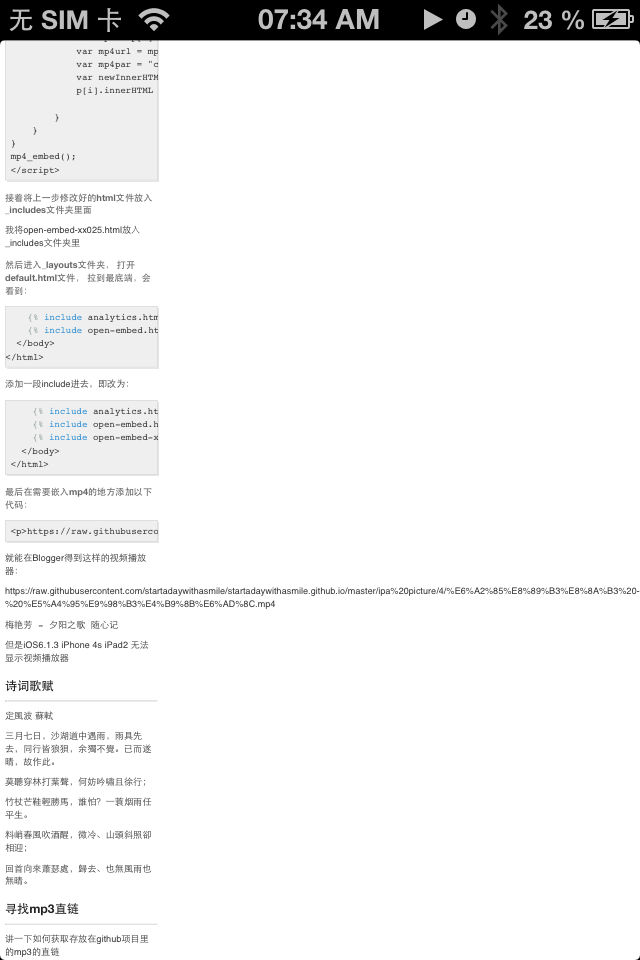
但是iOS6.1.3 iPhone 4s iPad2 无法显示视频播放器,考虑到美观问题,我使用了breakAll断句, 即修改为
<style>
	.breakAll{word-break:break-all;}
</style>
<p class = "breakAll">https://raw.githubusercontent.com/startadaywithasmile/startadaywithasmile.github.io/master/ipa%20picture/4/%E6%A2%85%E8%89%B3%E8%8A%B3%20-%20%E5%A4%95%E9%98%B3%E4%B9%8B%E6%AD%8C.mp4</p>
就能在Blogger得到这样的视频播放器:
https://raw.githubusercontent.com/startadaywithasmile/startadaywithasmile.github.io/master/ipa%20picture/4/%E6%A2%85%E8%89%B3%E8%8A%B3%20-%20%E5%A4%95%E9%98%B3%E4%B9%8B%E6%AD%8C.mp4
梅艳芳 - 夕阳之歌 随心记
诗词歌赋
定風波 蘇軾
三月七日,沙湖道中遇雨,雨具先去,同行皆狼狽,余獨不覺。已而遂晴,故作此。
莫聽穿林打葉聲,何妨吟嘯且徐行;
竹杖芒鞋輕勝馬,誰怕?一蓑烟雨任平生。
料峭春風吹酒醒,微冷、山頭斜照卻相迎;
回首向來蕭瑟處,歸去、也無風雨也無晴。
寻找mp3直链
讲一下如何获取存放在github项目里的mp3的直链
这里详细举个例子:
>Pi Ano - Without You.mp3 路径:https://github.com/startadaywithasmile/startadaywithasmile.github.io/blob/master/ipa%20picture/4/Pi%20Ano%20-%20Without%20You.mp3
>右键View raw,链接另存为... 路径:https://github.com/startadaywithasmile/startadaywithasmile.github.io/blob/master/ipa%20picture/4/Pi%20Ano%20-%20Without%20You.mp3?raw=true
>将github.com 改为 raw.githubusercontent.com,并且删除/blob 得到mp3直链:https://raw.githubusercontent.com/startadaywithasmile/startadaywithasmile.github.io/master/ipa%20picture/4/Pi%20Ano%20-%20Without%20You.mp3
或者打开IDM,点击View raw,下载文件信息中URL一行即为直链:
>https://raw.githubusercontent.com/startadaywithasmile/startadaywithasmile.github.io/master/ipa%20picture/4/Pi%20Ano%20-%20Without%20You.mp3
寻找mp4直链
讲一下如何获取存放在github项目里的mp4的直链
这里详细举个例子:
>梅艳芳 - 夕阳之歌.mp4 路径:https://github.com/startadaywithasmile/startadaywithasmile.github.io/blob/master/ipa%20picture/4/%E6%A2%85%E8%89%B3%E8%8A%B3%20-%20%E5%A4%95%E9%98%B3%E4%B9%8B%E6%AD%8C.mp4
>右键View raw,链接另存为... 路径:https://github.com/startadaywithasmile/startadaywithasmile.github.io/blob/master/ipa%20picture/4/%E6%A2%85%E8%89%B3%E8%8A%B3%20-%20%E5%A4%95%E9%98%B3%E4%B9%8B%E6%AD%8C.mp4?raw=true
>将github.com 改为 raw.githubusercontent.com,并且删除/blob 得到mp4直链:https://raw.githubusercontent.com/startadaywithasmile/startadaywithasmile.github.io/master/ipa%20picture/4/%E6%A2%85%E8%89%B3%E8%8A%B3%20-%20%E5%A4%95%E9%98%B3%E4%B9%8B%E6%AD%8C.mp4
或者打开IDM,点击View raw,下载文件信息中URL一行即为直链:
>https://raw.githubusercontent.com/startadaywithasmile/startadaywithasmile.github.io/master/ipa%20picture/4/%E6%A2%85%E8%89%B3%E8%8A%B3%20-%20%E5%A4%95%E9%98%B3%E4%B9%8B%E6%AD%8C.mp4
CSS自动换行、强制不换行、强制断行、超出显示省略号
以下转载自CSS自动换行、强制不换行、强制断行、超出显示省略号一文:
作者suwu150写于2019-05-31 00:20:08
<!doctype html>
<html lang="en">
	<head>
		<meta http-equiv="content-type" content="text/html;charset=utf-8" />
		<meta name="Keywords" content="关键词一,关键词二">
		<meta name="Description" content="网站描述内容">
		<meta name="Author" content="Yvette Lau">
		<title>Document</title>
		<style>
			.word{
			  background:#E4eFE9;
        width:300px;
        margin:50px auto;
        padding:20px;
        font-family:"microsoft yahei";
        }
			/* 强制不换行 */
			.nowrap{white-space:nowrap;}
			/* 允许单词内断句,首先会尝试挪到下一行,看看下一行的宽度够不够,
			不够的话就进行单词内的断句 */
			.breakword{word-wrap: break-word;}
			/* 断句时,不会把长单词挪到下一行,而是直接进行单词内的断句 */
			.breakAll{word-break:break-all;}
			/* 超出部分显示省略号 */
			.ellipsis{text-overflow:ellipsis;overflow:hidden;}
		</style>
	</head>
	<body>
		<div class = "word">
			<p class = "nowrap">wordwrap:breakword;absavhsafhuafdfbjhfvsalguvfaihuivfs</p>
			<p class = "breakword">wordwrap:break-word;absavhsafhuafdfbjhfvsalguvfaihui</p>
			<p class = "breakAll">wordwrap:break-word;absavhsafhuafdfbjhfvsalguvfaihuivf</p>
			<p class = "normal">wordwrap:breakword;absavhsafhuafdfbjhfvsalguvfaihuivfsa</p>
			<p class = "ellipsis">wordwrap:breakword;absavhsafhuafdfbjhfvsalguvfaihuivfsab</p>
		</div>
	</body>
</html>
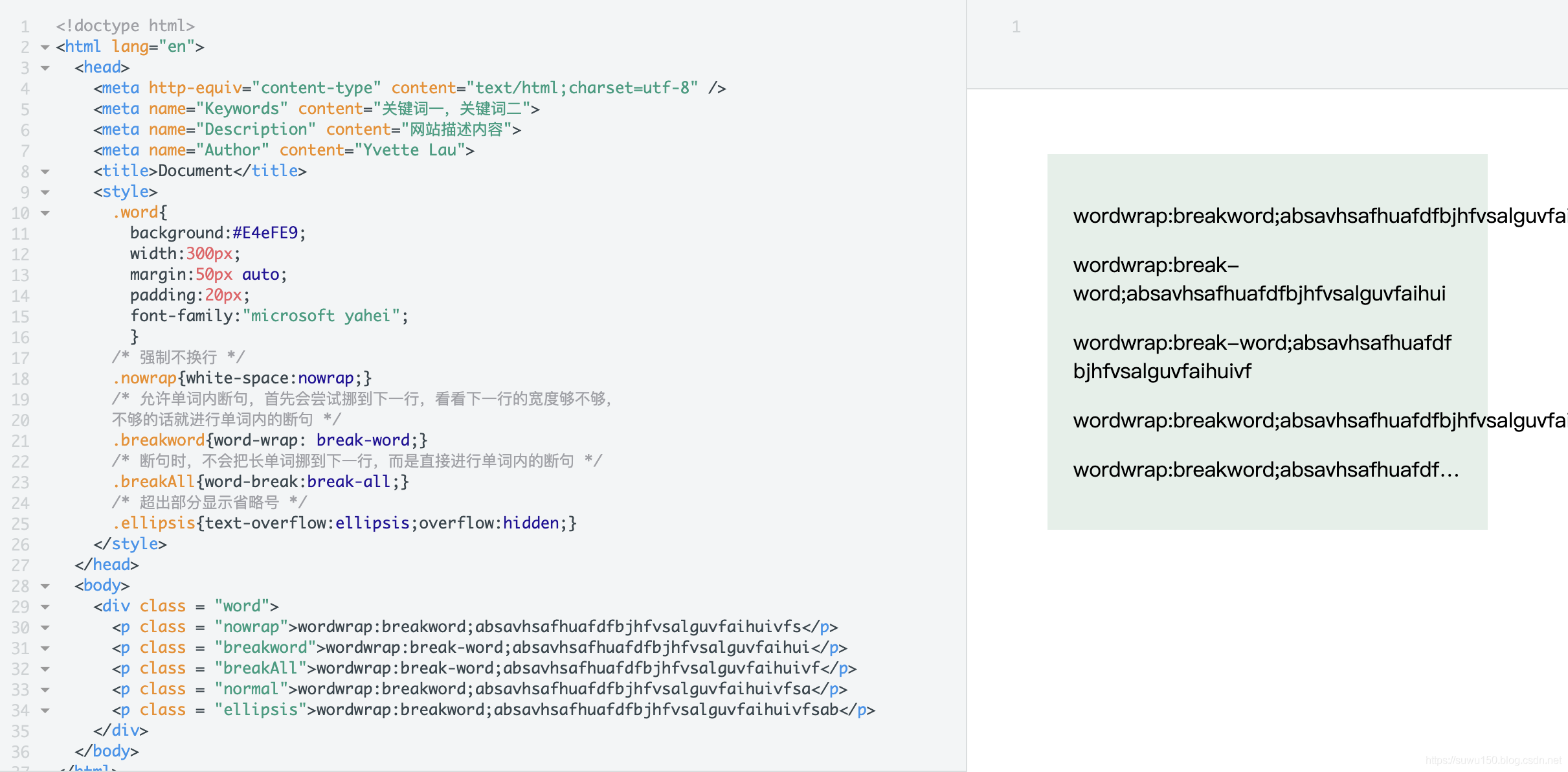
效果如下

Alfred Sisley - Small Meadows in Springs
日安